
AI intent infrastructure, starting in your browser
The intelligence layerbefore AI acts.
BeforePrompt helps you turn raw intent into clear, contextual, safe instructions before ChatGPT, Claude, Gemini, or Copilot acts. Start in the browser and keep using the AI tools you already know.
Local checks run in your browser. Cloud actions happen only when you ask.
Live in your prompt box
Prompt draft47 words
Write a launch email for our new reporting feature. It's for operations managers who are tired of building weekly updates by hand.
ImproveShortenStructureClarify
82prompt score
Clear audience
Add output format
No sensitive data
Ready for a stronger first answer
Understand intent✦Add context✦Protect sensitive data✦Choose the next action✦Understand intent✦Add context✦Protect sensitive data✦Choose the next action✦
The AI Intent Gap
The model can only act on what it receives.
The gap between what you mean and what AI receives creates avoidable guesses, correction loops, and risk. BeforePrompt makes the highest-impact missing piece visible while the instruction is still yours to change.
01
Start with what you mean
Write naturally inside ChatGPT, Claude, Gemini, or Copilot. BeforePrompt works beside the prompt box you already use.
02
See the intent gap
A local check finds unclear outcomes, missing context, hidden constraints, contradictions, and sensitive details before anything is sent.
03
Choose the next action
Clarify, improve, structure, or answer the missing questions. You decide whether to keep the draft or use a cloud action.
From raw thought to AI-ready action
Make the intent executable before you send it.
Start with the kind of request people write every day. BeforePrompt identifies the intended outcome, spots missing context or risk, and shows a stronger instruction you can inspect before you use it.
Your meaning stays visibleCompare the original request with the suggested instruction in full.
The next action stays yoursAccept, edit, dismiss, or continue with the original draft.
✦AI workspaceGeneral model
What are you working on?BeforePrompt checks the draft before it leaves the box.
BeforePromptWriting
48Watching the prompt box locally. Nothing is sent or rewritten yet.
Local check · rewrite only after approval
Three prompts. Three visible improvements.The demo illustrates the real BeforePrompt flow; example wording is shown in full.
Works where the prompt lives
Four AI workspaces today. Three more under exploration.
The current extension runs inside ChatGPT, Claude, Gemini, and Microsoft Copilot. Perplexity, DeepSeek, and Le Chat are being evaluated. Exploration is not a release commitment or a promise of support.
Available in the current extension
Exploring — no release commitment
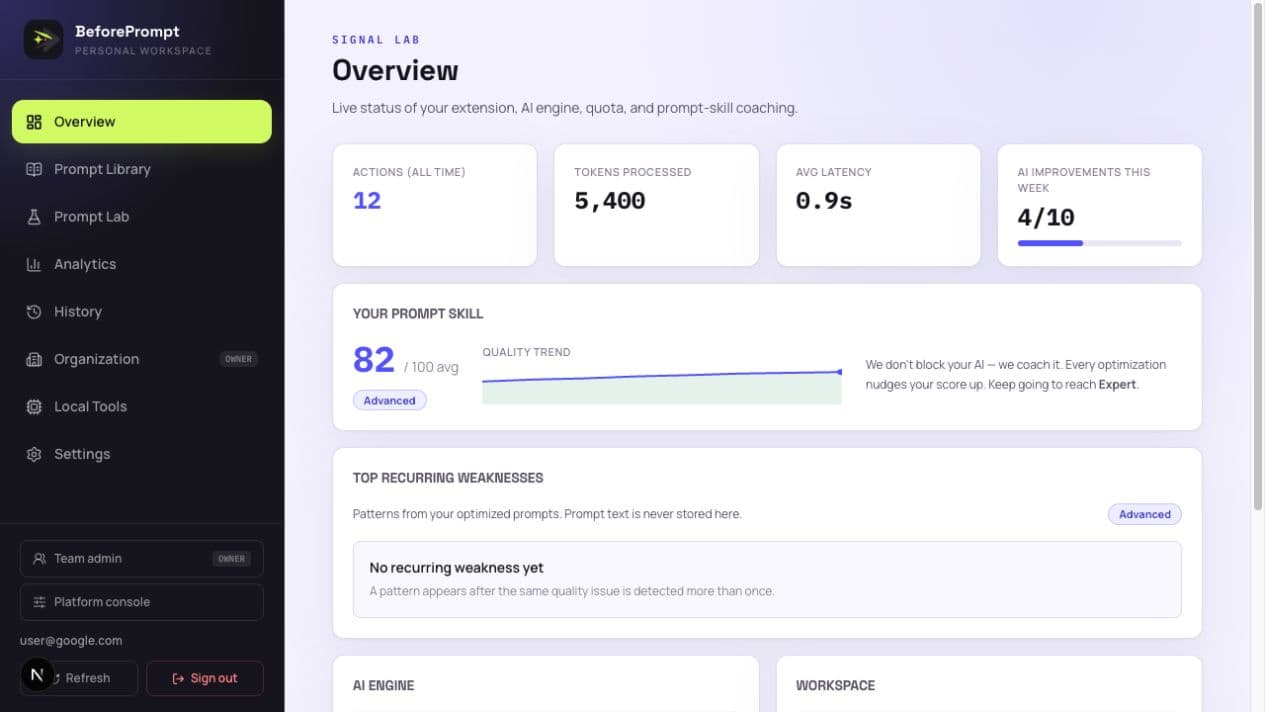 Personal coaching Privacy controls
Personal intelligence
See how you work with AI—not just how often.
The current dashboard brings quality trends, action history, privacy choices, and your reusable instructions together. Limited team and local-tool features are labelled separately while they are being tested. It is the foundation for a practical question: where does your AI work become clearer, safer, and easier to execute?
- Quality trends and coaching signals
- History stays off until you opt in
- Personal prompt collections and saved work
- Clear status labels for features still in testing
A supporting resource
When the work repeats, do not start from an empty box.
The library is one part of BeforePrompt, not the product definition. Every prompt has a job, an expert perspective, named inputs, a clear output contract, and honest limitations. Browse50 complete prompts in public, then search 1,000+ across 28 domains in the workspace.
1,000+
approved prompts
28
domain collections
200+
subcategories
50
free public prompts
Marketing
Campaigns, messaging, and growth
Human Resources
Hiring, people, and policy
Software Engineering
Building, reviewing, and debugging
Business Strategy
Decisions, planning, and analysis
Education
Teaching, learning, and assessment
Legal
Review, compliance, and issue spotting
Your prompt library
You write the perfect prompt once.Then you lose it.
It gets buried three chats deep, or pasted into a Note you never open again. By Friday you are rebuilding it from memory. BeforePrompt gives your best prompts a home — save them, organize them, reuse them in a click, share them with your team, and publish the great ones to the community.
Save the ones that work
Nail a prompt and keep it. Save it in a click from the extension or the dashboard — it is there next Tuesday, not lost three chats deep.
Organized so future-you can find it
Collections, labels, and pins. Search your whole library by title, text, or label. Open any saved prompt straight into the Lab to reuse it.
Hand it to a teammate
Share a working prompt with someone on your team, in-product. They get it read-only, and you can revoke access the moment you want to.
Learn from the community
Publish your best prompts for everyone, and borrow what others share. Private by default — nothing goes public until you say so, and we scan for sensitive data first.
Start your library Private by default. You choose what to share.
Team prompt operations
Give good AI work a way to travel across the team.
Team templates, policy guardrails, and aggregate coaching are currently testing with limited access—not generally available enterprise features.
Currently Testing
01
Standardize
Turn proven prompts into reusable team templates.
02
Guide
Catch risky terms before the instruction is sent.
03
Coach
Use aggregated quality signals to plan support.
See the team workspace Raw prompt text stays out of team analytics by default.
Privacy-first setup Human follow-up
At a glance
What BeforePrompt is, in one screen.
BeforePrompt is the intelligence layer before AI acts. Today it starts as a browser extension that reviews instructions locally, identifies missing context and risk, and offers deliberate actions inside ChatGPT, Claude, Gemini, and Copilot.
Updated August 2026 · Independent product built in India
| What it is | An intent, context, and safety layer before AI execution |
|---|---|
| Works with | ChatGPT, Claude, Gemini, and Microsoft Copilot |
| Where it runs | A Chrome extension, right in the prompt box |
| The first check | Runs locally in your browser — your draft is not sent to be scored |
| Cloud actions | Improve, Shorten, Structure, Clarify — only when you click |
| Supporting library | 1,000+ approved prompts across 28 domains, with 50 free public samples |
| Your library | Save, organize, and reuse your own prompts; share with your team or the community |
| Direction | Browser first; broader AI surfaces are exploration or long-term direction |
Questions
Good to know before you install.
The short version: it starts in your browser, keeps the first check local, and lets you decide what happens next. The details are on the right.
What is the AI Intent Gap?
It is the difference between what you want accomplished and what an AI system actually understands, receives, and executes. Missing context, unclear outcomes, hidden constraints, sensitive data, and the wrong execution path all widen that gap.
What does “AI Intent Infrastructure” mean?
It is the layer that helps understand, enrich, protect, route, and measure human instructions before AI acts. BeforePrompt starts with a browser extension and is building toward that broader layer.
Is BeforePrompt free to use?
BeforePrompt has a free plan for everyday checks and public prompt examples. The pricing page shows the current paid option and its additional limits and library access.
Which AI tools does BeforePrompt work with?
It runs right inside the prompt box on ChatGPT, Claude, Gemini, and Microsoft Copilot. There is no separate app to switch to — the check appears where you already type.
Do you send my prompts to a server?
The quality check runs locally in your browser, so your draft never leaves your machine to be scored. A cloud model is only used when you explicitly click a rewrite action like Improve or Shorten.
What actually is the prompt library?
It is a supporting resource with 1,000+ approved prompts across 28 work domains. Fifty complete prompts are public and free to copy. Each one carries an expert role, named inputs, a defined output, and practical limitations.
Can I save and share my own prompts?
Yes. Save any prompt you write to your personal library, organize it with collections, labels, and pins, and reuse it in one click. You can share a prompt privately with a teammate inside BeforePrompt, or publish it to the public community library. Your prompts stay private by default, and BeforePrompt checks for sensitive data before anything is published.
Do I need an account?
You sign in once on the dashboard, which syncs a secure token to the extension. After that the checks and library work in the background while you write.
Before AI acts